
Every FHIR resource carries meta.lastUpdated. Every version bump changes it. If your diff tool flags it, every diff drowns in one meaningless field. The instinct is to blanket-ignore meta. That instinct catches useful signals along with the noise. Knowing exactly which meta fields to ignore, and which to keep, is a small discipline that keeps diffs honest. The site's Resource-vs-resource comparator applies these rules by default. For the wider FHIR framing, more FHIR implementation patterns has more.
What Lives Inside meta
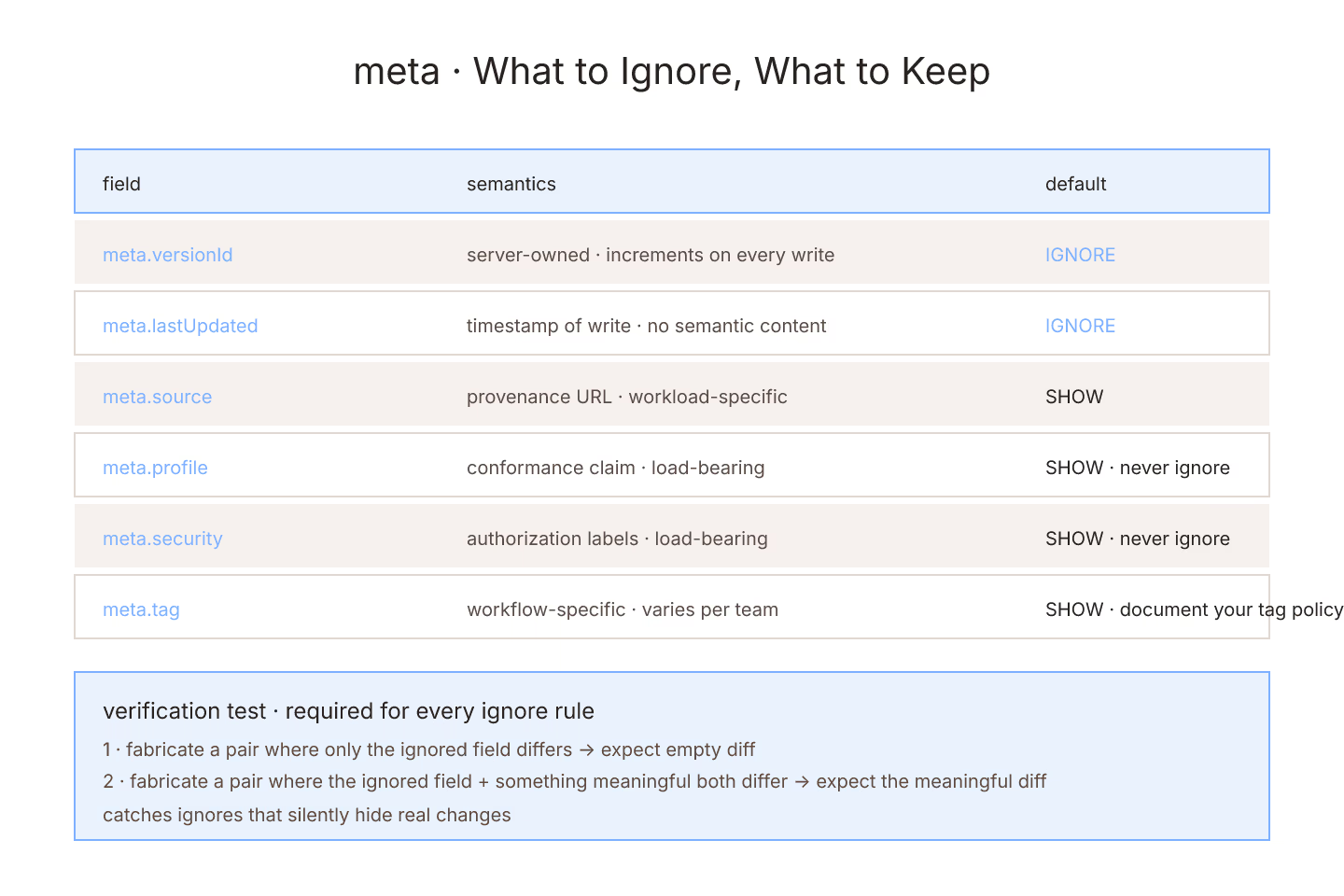
versionId— the server's version numberlastUpdated— the timestamp of the last writesource— the source system URLprofile— the profiles the resource conforms tosecurity— security labelstag— arbitrary tags
Some fields are noise per diff. Others carry information you want to see.
Safe To Ignore For Most Diffs
versionId— increments on every write, no semantic contentlastUpdated— timestamp of write, no semantic content
Both are server-owned bookkeeping. Ignoring them removes noise on almost every real diff.
Not Safe To Ignore
profile— the claimed profile matters; conformance-relevant changes here are meaningfulsecurity— security label changes are load-bearingtag— some tags carry real state; ignoring them can hide the changesource— meaningful in provenance workflows
Ignoring these produces diffs that hide real changes. For the resource-level noise-reduction pattern, diffing two FHIR resources without drowning in reference noise is the entry.
The Case-By-Case Decision
Every field's ignore status is workload-specific:
- Compliance workflow — do not ignore anything under meta
- Version-diff during development — ignore versionId + lastUpdated
- Post-migration comparison — ignore everything except profile
- Signature-verification diff — ignore nothing (structural mode)
The comparator lets you configure. Do it once per team and store the config in your repository.
The Case Of `source`
meta.source records where a resource originated. In simple deployments, it does not change. In federated or migration deployments, it is exactly the field you want to see changing.
Blanket-ignoring it hides migration events. Blanket-showing it produces noise on every routine save. Default: show it and adjust per workload.
The Case Of `profile`
meta.profile claims profile conformance. Silently changing profile is a real semantic change — new consumers may reject the resource under different validation rules.
Never ignore meta.profile in diffs. If your diff tool blanket-ignores meta, verify profile is surfaced separately.
The Case Of `security`
Security labels are load-bearing for authorization. Ignoring them means a diff that hides a real security state change.
Never ignore meta.security.
The Case Of `tag`
Tags are the most workflow-specific meta field. Some deployments use tags for real state (locked, provisional, verified). Others use tags for logging or metadata.
The right rule: know what your tags mean and ignore only the ones that carry no meaning.
Documenting Your Meta Policy
Every team should have a written meta-ignore policy:
- Which meta fields we ignore in diffs
- Why we ignore each
- Which are strictly load-bearing (never ignore)
Put it in the repository next to your formatter conventions. For the PR review side, reviewing FHIR diffs in a pull request is the entry.
Verify The Ignore List
Every ignore rule should be tested:
- Fabricate a resource pair where the ignored field differs and nothing else
- Verify the diff is empty
- Fabricate a resource pair where the ignored field differs plus something meaningful
- Verify the meaningful change surfaces
That confirms the ignore is working and not hiding real changes.
The Short Version
Ignore versionId and lastUpdated by default. Never ignore profile, security, source (unless documented). Configure per workload. Document the policy. Verify with tests. For the semantic vs structural framing, structural diff vs semantic diff for FHIR JSON is the entry.
Sources
- HL7 canonical Meta datatype specification - HL7 canonical Meta datatype specification